Why your Webflow site should always score 90+ on PageSpeed Insights
Small habits that decide whether your Webflow site loads fast or loses visitors

Hitting a 90+ score on Google PageSpeed Insights should be the default for every web developer, not a nice to have. A fast site keeps visitors around, helps with indexing, and gives you a real edge in SEO rankings.
If a site takes more than five seconds to load, I leave. I have been on both sides of this as a developer and as a customer, and the behavior is the same. Slow sites lose people.
Webflow is one of the best platforms for performance out of the box, and that is one of the main reasons I keep choosing it for client work. But out of the box only gets you so far. The small things developers skip are usually what tank the score.
Here is what I see go wrong most often, and what to fix.
Compress your assets inside Webflow
Webflow lets you compress every asset directly inside the platform and convert images to modern formats like AVIF and WebP. No manual exports, no third party tools, no scripts to write.
On a recent project with hundreds of images I compressed assets by up to 80 percent and saved close to 1 GB. It took minutes and the visual quality stayed intact. This is the single biggest win available to you, and most developers skip it.
Remove scripts you are no longer using
Imagine you added Finsweet Attributes to test out filters, decided they were not the right fit, and removed them from the Designer. If you forgot to also remove the script from the page or project settings, that script is still being downloaded on every visit and doing absolutely nothing.
It is like handing someone a house with no keys. The weight is there, but the function is gone. Audit your custom code regularly and pull out anything that no longer serves a purpose.
Only load the font weights you actually use
I have been guilty of this one myself. I would import every weight of a typeface thinking I might need them later. In practice I use 400 and 700 most of the time. Every extra weight is another file the browser has to download, and the user pays the cost.
Open your project settings, check what your design system actually uses, and remove the rest.
Size your images to match the container
A 1080 by 1080 pixel slot does not need a 3500 by 3500 pixel image. That is like buying a wholesale-sized pack for a two year old, way more than what is needed and most of it goes to waste.
Export images at roughly the size they will actually be displayed, then let Webflow handle responsive variants from there.
Reuse classes instead of styling everything individually
This one is not negotiable for performance or maintainability. Class names like Text Block 42 or Div Block 20 are a sign the project will be painful to scale and the CSS file will keep growing.
Want to center text across your site? Create a single .center class and apply it wherever you need it instead of centering every paragraph manually. Fewer classes means less CSS, which means a faster site. The Client-First methodology is built around exactly this principle and it is worth adopting from day one.
Clean up unused animations and styles
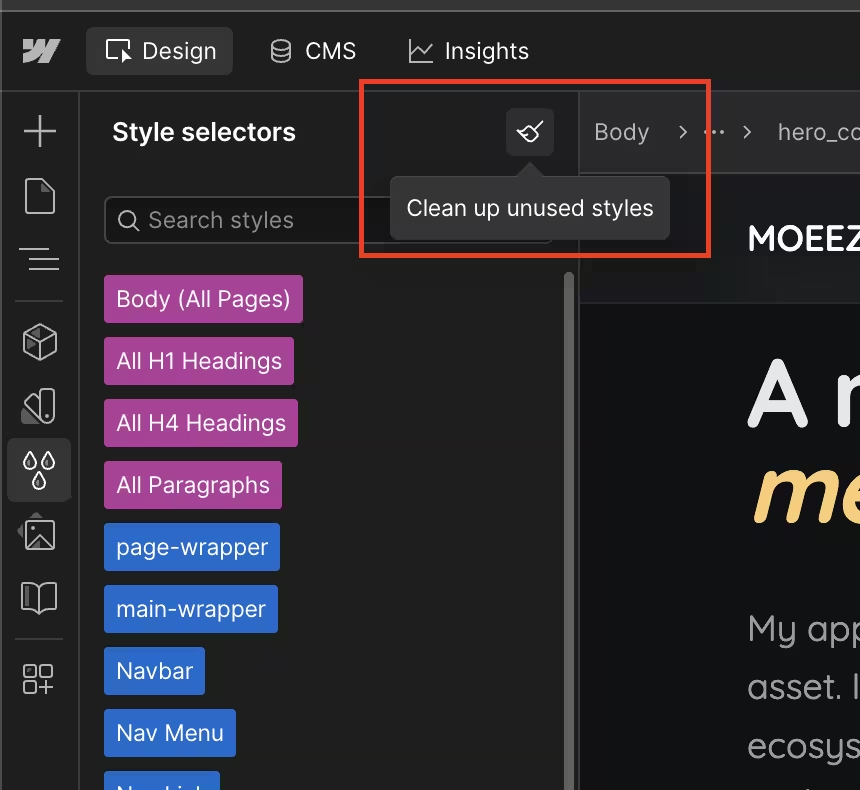
Webflow makes it easy to build animations, which also makes it easy to leave a pile of them sitting around unused. Same goes for styles and classes. Both add weight to your project even when nothing on the live site references them. Open the Style Manager, run a cleanup, and delete anything that is not in use.
Use Webflow's built in SEO fields properly
SEO titles, meta descriptions, Open Graph images, and structured data are all available inside Webflow's page settings. Fill them in on every single page. This is not directly a performance issue, but it is the other half of why a 90+ score matters in the first place.
Add alt text to every image
Every image needs alt text. If the image is decorative, mark it as decorative so screen readers know to skip it. This is good for accessibility, good for SEO, and takes about three seconds per image.
Closing thought
Performance is not one big trick, it is a stack of small habits. Compress your assets, prune what you are not using, size things properly, and reuse your classes. Do these consistently and 90+ stops being a goal and starts being the floor you build everything else on top of.